For trying your first workflow.
$0/ free tier
No payment required
Explore Free30 actions / month
- ChatGPT workflow authoring
- Reusable DOCX & PDF templates
- Logic, approvals & signatures
- Google Drive & Gmail delivery
Automate documents, approvals, signatures, and email.
Free plan: 30 actions / month. See the plans
For existing pilot workspaces.

Client details received.

Your template. Reviewed & signed by your client.

Sent by Gmail. Saved to Drive.
Google FormsCollect details. Get the agreement signed. Send the PDF.

FROM THE BLOG
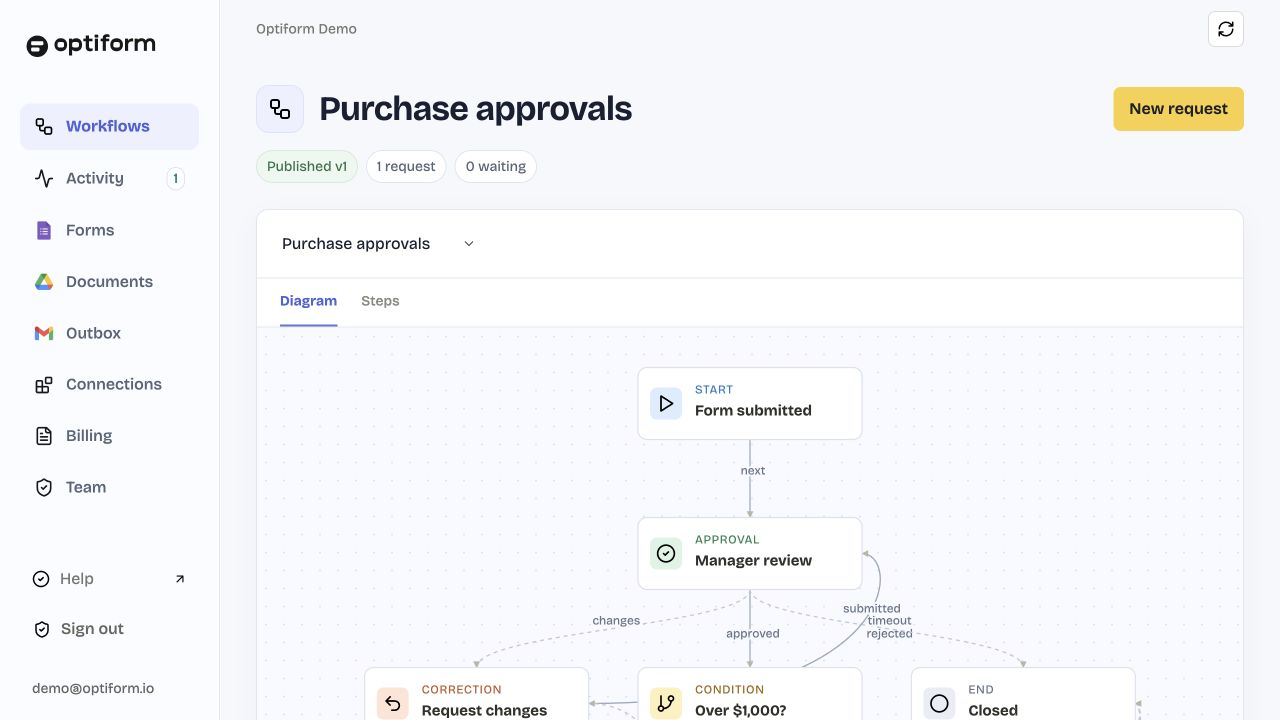
Collect the request, route the decision, and keep every step visible.
Prepare one template, map stable fields, and generate consistent files.
Send a clear signing step and keep the completed PDF with the request.
For trying your first workflow.
No payment required
Explore Free30 actions / month
Unlimited automation for one account.
Billed monthly · 14-day guarantee
Choose IndividualUnlimited actions
For shared workflows and team accounts.
Billed monthly · 14-day guarantee
Choose BusinessUnlimited actions
| Feature | Free | Individual | Business |
|---|---|---|---|
| Actions / month | 30 | Unlimited | Unlimited |
| Connected Google accounts | 1 | 1 | Multiple |
| Workspace members | 1 | 1 | Team |
| Workspace administrators | 1 | 1 | Multiple |
| Forms, documents & templates | ✓ | ✓ | ✓ |
| Logic, approvals & signatures | ✓ | ✓ | ✓ |
| Reminders, delivery & history | ✓ | ✓ | ✓ |
| Requester or approver fees | None | None | None |
| Shared team workspace | — | — | ✓ |
No. ChatGPT helps you design and review the process. Once published with an enabled trigger, Optiform runs the saved workflow on its server.
Yes. Import a reusable DOCX or PDF and map fields to form answers, or ask ChatGPT to use its available document skills. Preview generated PDFs before publishing, especially after converting Word documents.
Reviewers receive private task links. A signer reviews the PDF, gives consent, and adds a typed or drawn signature to a new PDF copy. The original and audit evidence are retained. These are electronic signatures, not certificate-backed digital signatures.
An enabled Google Forms watch sends a Pub/Sub notification after a submission. Optiform then fetches the response and runs the workflow. Google can group or delay notifications. The operator’s Google project needs Pub/Sub billing enabled.
Your first Individual or Business payment can be refunded within 14 calendar days. Dodo Payments processes the refund and paid access ends when it is confirmed. Read the terms.
You can sign in and create a private workspace. Free includes 30 completed actions each month. Current paid-plan availability appears above.
No. Optiform is independent and connects to your authorized services. Google and ChatGPT account requirements, permissions, and service limits still apply.